
Disclaimer: This page may contain affiliate links. Learn More.
I love my Kindle Paperwhite. It has so many features that make it a delight for reading. I get asked all the time if you can listen to audiobooks on the Kindle. The answer is yes, but only if you have an audio books from Audible.
I thought I would write a tutorial for you step by step so you can refer back!
- The first thing you need to do is connect your Kindle to a bluetooth speaker. Go to All Settings>Wi-Fi and Bluetooth and make sure “Bluetooth” is turned on.
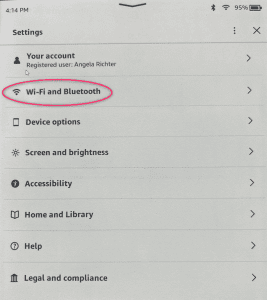
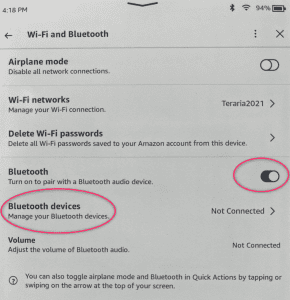
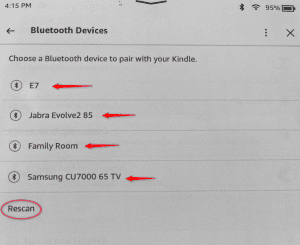
- Then click “Bluetooth devices” and if you don’t see your listening device, click “Rescan” and make sure your headphones or speaker, etc…is in pairing mode.
- Open the book from your library on the Kindle. Audible books are grouped under “Uncollected”.
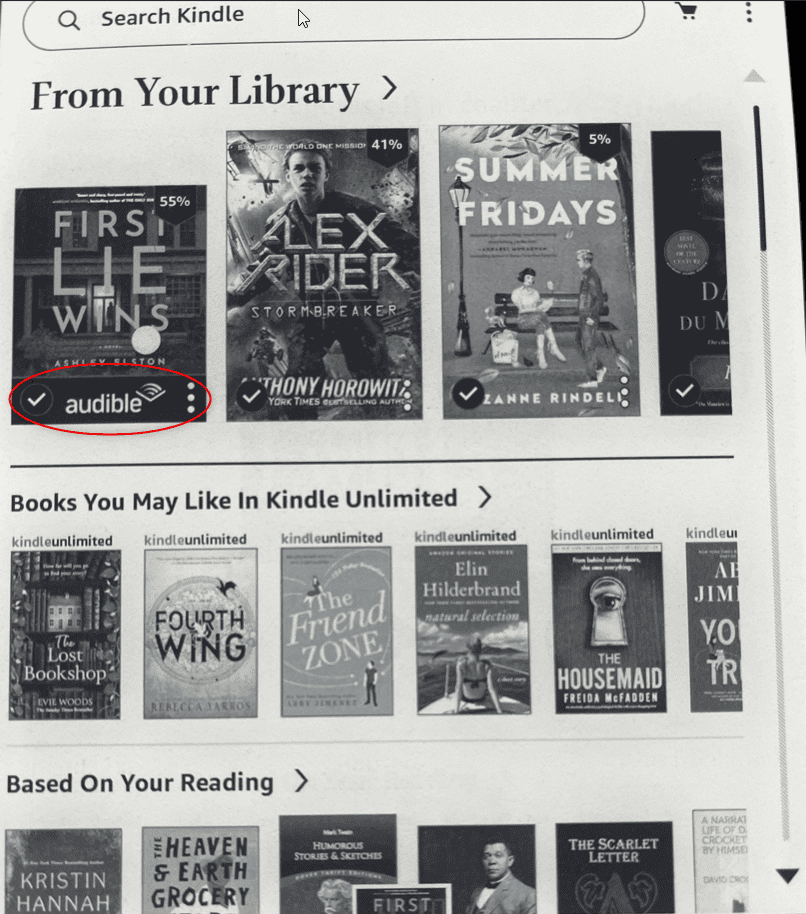
- Your Audible books will be marked at the bottom of each icon with the word Audible. Then open the book you want to listen to (it may have to download).
- Once downloaded, tap the play icon to start listening to the audiobook.

In conclusion
I hope this helps you connect your Kindle to your bluetooth for book listening!
Other posts you may enjoy:
WANT TO REMEMBER THIS? SAVE THIS BOOK LIST TO YOUR FAVORITE BOOK PINTEREST BOARD!